
 village
bpod_outputs_and_events.py
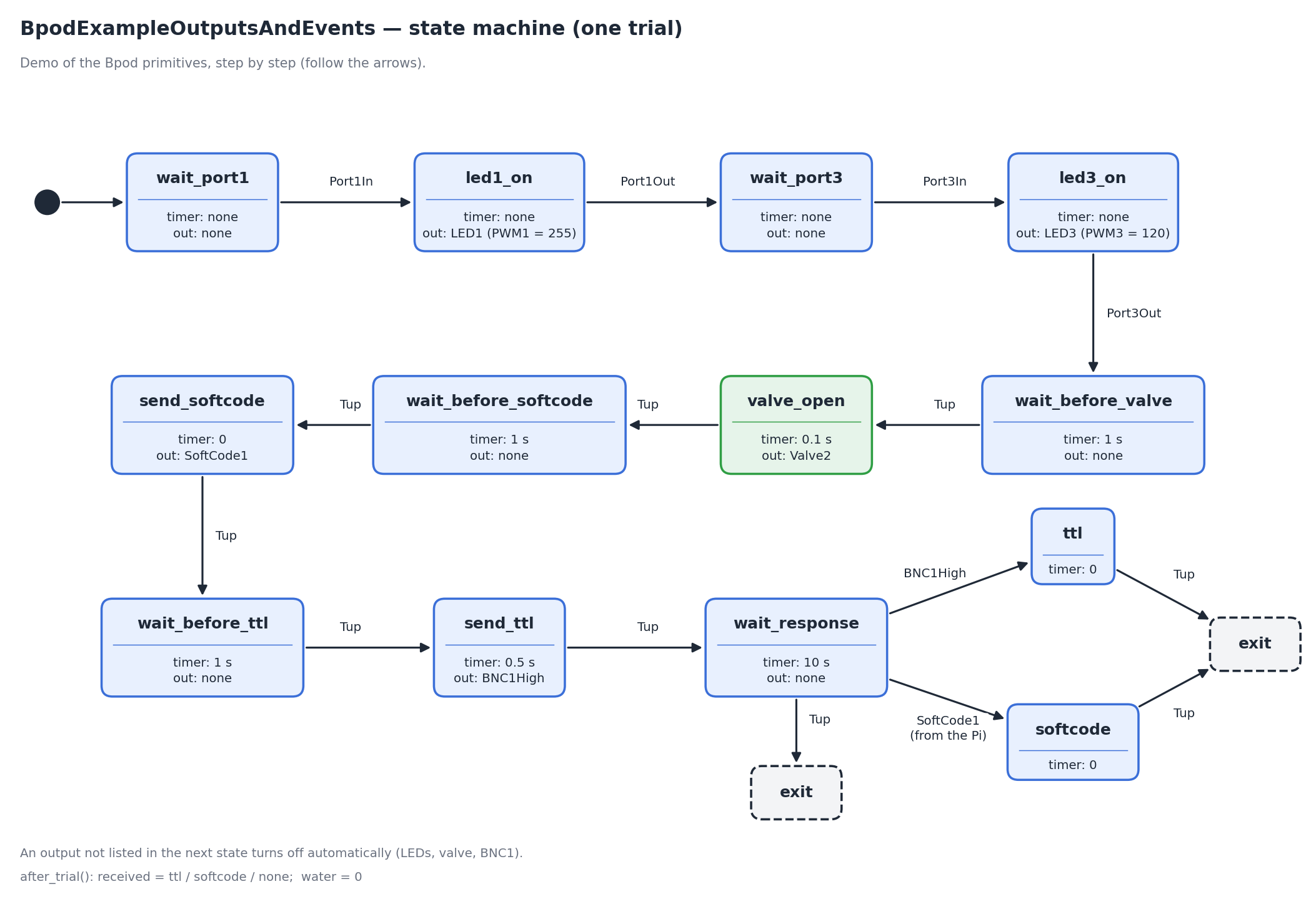
Demo, not a training task: the Bpod primitives step by step — LEDs, valves, softcodes, TTL outputs and inputs.
Download bpod_outputs_and_events.py
import math

from village.custom_classes.task_base import BpodEvent, BpodOutput, TaskBase


class BpodOutputsAndEvents(TaskBase):
    """Reference task: not a real behavioral protocol, just a walkthrough of
    the Bpod primitives available from create_trial, one per state:

    - Turn an LED fully on (PWM at max, 255)
    - Turn an LED on at a given intensity (PWM at an arbitrary value)
    - Open a valve for a fixed time
    - Detect a poke in (Port*In)
    - Detect a poke out (Port*Out)
    - Send a softcode (Bpod -> Raspberry Pi, triggers a direct function)
    - Receive a softcode (Raspberry Pi -> Bpod, sent via
      self.task.bpod.send_softcode_to_bpod(1); see the touchscreen docs)
    - Send a TTL pulse (Bpod -> an external device, on a BNC output)
    - Receive a TTL pulse (an external device -> Bpod, on a BNC input)

    See bpod_global_timer.py for the global timer primitive.

    Note on Bpod outputs: every state resets all outputs to off/0 first and
    then applies only what's listed in that state's own output_actions -- so
    an LED (or a valve, or a BNC line) that isn't re-listed in the next state
    turns off automatically, no explicit "off" action needed.
    """

    def __init__(self):
        super().__init__()

        self.info = """
        Outputs & Events Demo (Bpod)
        ----------------------------------------------------------------
        Not a real task -- a step-by-step demo of the Bpod primitives:
        1. Wait for a poke in port 1, turn LED1 fully on.
        2. Wait for the poke out of port 1, turn LED1 off.
        3. Wait for a poke in port 3, turn LED3 on at a lower intensity.
        4. Wait for the poke out of port 3, turn LED3 off.
        5. Wait 1s, then open valve 2 for 0.1s.
        6. Wait 1s, then send softcode 1 (to the Raspberry Pi).
        7. Wait 1s, then send a 0.5s TTL pulse (on BNC1, to an external device).
        8. Wait 10 seconds for either an incoming TTL pulse (on BNC1) or
            an incoming softcode 1 (from the Raspberry Pi), then exit.
        """

    def start(self):
        """Nothing to set up for this demo task."""

        pass

    def create_trial(self):
        # 1. Wait for a poke in port 1 (no timeout: state_timer=0 and no Tup
        # condition means "wait indefinitely for the listed event(s)").
        self.bpod.add_state(
            state_name="wait_port1",
            state_timer=0,
            state_change_conditions={BpodEvent.Port1In: "led1_on"},
            output_actions=[],
        )

        # LED fully on (PWM at max, 255), until the poke out.
        self.bpod.add_state(
            state_name="led1_on",
            state_timer=0,
            state_change_conditions={BpodEvent.Port1Out: "wait_port3"},
            output_actions=[(BpodOutput.PWM1, 255)],
        )

        # LED1 isn't listed here, so it turns off automatically.
        self.bpod.add_state(
            state_name="wait_port3",
            state_timer=0,
            state_change_conditions={BpodEvent.Port3In: "led3_on"},
            output_actions=[],
        )

        # LED on at a given intensity (0-255), until the poke out.
        self.bpod.add_state(
            state_name="led3_on",
            state_timer=0,
            state_change_conditions={BpodEvent.Port3Out: "wait_before_valve"},
            output_actions=[(BpodOutput.PWM3, 120)],
        )

        # LED3 isn't listed here, so it turns off automatically. Just a 1s pause.
        self.bpod.add_state(
            state_name="wait_before_valve",
            state_timer=1,
            state_change_conditions={BpodEvent.Tup: "valve_open"},
            output_actions=[],
        )

        # Open a valve for a fixed time (it closes automatically afterward,
        # same as the LEDs above).
        self.bpod.add_state(
            state_name="valve_open",
            state_timer=0.1,
            state_change_conditions={BpodEvent.Tup: "wait_before_softcode"},
            output_actions=[BpodOutput.Valve2],
        )

        self.bpod.add_state(
            state_name="wait_before_softcode",
            state_timer=1,
            state_change_conditions={BpodEvent.Tup: "send_softcode"},
            output_actions=[],
        )

        # Send a softcode: Bpod -> Raspberry Pi. This triggers
        # execute_function(1) on the Pi (see direct_functions.py)
        # state_timer=0 with a Tup condition just fires the pulse and
        # moves on immediately.
        self.bpod.add_state(
            state_name="send_softcode",
            state_timer=0,
            state_change_conditions={BpodEvent.Tup: "wait_before_ttl"},
            output_actions=[BpodOutput.SoftCode1],
        )

        self.bpod.add_state(
            state_name="wait_before_ttl",
            state_timer=1,
            state_change_conditions={BpodEvent.Tup: "send_ttl"},
            output_actions=[],
        )

        # Send a TTL pulse: Bpod -> an external device, on BNC1, high for 0.5s.
        # BNC1 isn't listed in the next state, so it goes back low automatically.
        self.bpod.add_state(
            state_name="send_ttl",
            state_timer=0.5,
            state_change_conditions={BpodEvent.Tup: "wait_response"},
            output_actions=[BpodOutput.BNC1High],
        )

        # Wait 10 seconds for either direction of input: a TTL pulse
        # arriving on a BNC input (channel1), or a softcode1 sent from the
        # Raspberry Pi via self.task.bpod.send_softcode_to_bpod(1) (see the
        # touchscreen docs for that example). Whichever arrives first
        # decides the branch.
        self.bpod.add_state(
            state_name="wait_response",
            state_timer=10,
            state_change_conditions={
                BpodEvent.BNC1High: "ttl",
                BpodEvent.SoftCode1: "softcode",
                BpodEvent.Tup: "exit",
            },
            output_actions=[],
        )

        self.bpod.add_state(
            state_name="ttl",
            state_timer=0,
            state_change_conditions={BpodEvent.Tup: "exit"},
            output_actions=[],
        )

        self.bpod.add_state(
            state_name="softcode",
            state_timer=0,
            state_change_conditions={BpodEvent.Tup: "exit"},
            output_actions=[],
        )

    def after_trial(self):
        """Just records which of the two final branches was taken, if any."""

        def visited(state: str) -> bool:
            # Bpod lists a state that was not visited as [nan]
            t = self.trial_data.get(f"STATE_{state}_START", [math.nan])[0]
            return not math.isnan(t)

        if visited("ttl"):
            received = "ttl"
        elif visited("softcode"):
            received = "softcode"
        else:
            received = "none"

        self.register_value("received", received)
        self.register_value("water", 0)

    def close(self):
        pass